Lessonspace
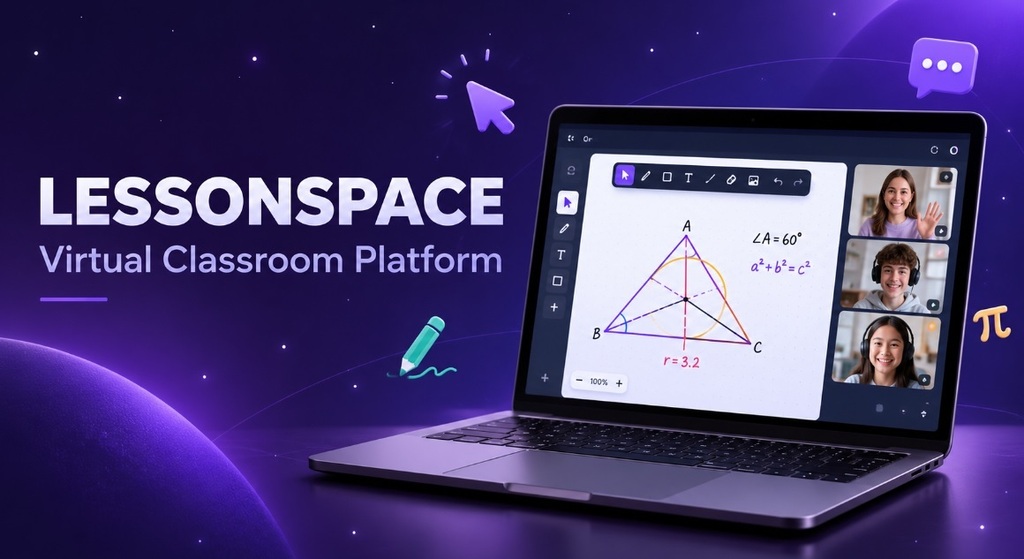
A virtual classroom platform that runs video, an infinite whiteboard, and shared documents in a single browser tab, so a lesson never stops to switch tools.
The problem
Tutoring companies were teaching around their video tool instead of with it.
Lessons were running on general-purpose conferencing software. That works for talking and falls apart the moment a tutor needs to actually teach something. Working through a quadratic or a titration meant screen sharing a separate whiteboard app, emailing worksheets in advance, and hoping the student had opened them. Students showed up to a download prompt or an account signup before the first lesson had even started, and some never made it past that screen.
For the organisations running hundreds of lessons a week, the gap was bigger than tool-switching. They had no view into what happened inside a session, no way to enforce which tools a student could touch, and no way to create a lesson from their own booking system. The classroom lived in someone else's product.
They didn't need another video call. They needed a classroom that opened in one click, carried subject-specific tools inside it, and could be created and embedded by their own platform through an API.
What I built
One space that holds the whole lesson.
Lessonspace puts video, an infinite collaborative whiteboard, shared documents, and a co-browser in the same session, so the tutor pulls in a worksheet, marks it up, switches to a graph, and browses a reference site without anyone leaving the room. I worked across the product: the real-time session layer, the media stack, the teacher control model, the organisation dashboard, and the developer API that lets a partner embed a space in their own app.
The design constraint throughout was the student's first thirty seconds. Students join from a link with no install and no account, on whatever device and connection they have, and the lesson starts on time.
- Real-time session layer syncing whiteboard strokes, documents, cursors, and tool state across participants
- Browser-based video, audio, screen sharing and chat for up to ten participants per space
- Subject tooling: maths notation, graphing, science and language tools, a code editor, worksheet upload and annotation
- Teacher controls: leading mode, board locking, per-student audio and video control
- Co-browser for navigating third-party sites together inside the space
- In-space resource library so files are pulled in mid-lesson rather than hunted for
- Organisation dashboard with accounts and permissions, per-space tool configuration, session analytics, and recording playback
- Public API and iframe embed for creating and configuring spaces programmatically
By the numbers
- One click
- To join, with zero installs
- 10
- Participants per space
- 99.9%
- Session availability
- Multi-region
- Server network
- Every session
- Recording and analytics
- SOC 2
- GDPR and COPPA aligned
Illustrative figures.
System design
One session, many surfaces, one source of truth.
The core decision was to treat a space as an authoritative, replayable session rather than a set of loosely connected clients. Whiteboard and document changes travel as ordered operations against shared session state, not as screen diffs, which means a student who joins ten minutes late or reconnects after a dropout rebuilds the exact board the rest of the room is looking at, with history intact.
Media is deliberately kept on a separate path. Video and audio run through an SFU and degrade on their own terms, so a student on a weak home connection loses video quality without freezing the whiteboard or dropping the lesson content. The two failure modes stay independent, because losing the picture is an inconvenience and losing the work is the end of the lesson.
Permissions resolve at join time from the organisation's configuration rather than being hardcoded in the client. The same application renders a full teacher view, a locked-down student view, or a custom partner-branded space depending on what the space was created with, which is what made the API embed viable: a partner creates a space with the exact tool set they want and drops it into their own product.
If the lesson starts late, nothing else about the product matters.
Reliability and rollout
Built around a hard start time.
Education has an unusual failure profile. A lesson is a scheduled, paid, thirty-minute window with a child on the other end, so degraded is always better than down. Servers are selected regionally at session creation to keep round trips short wherever the student is. Reconnection restores session state instead of dropping someone into an empty room, and the client assumes disconnects will happen rather than treating them as exceptions. Recording and session analytics are captured as part of the session pipeline, so an organisation can review quality afterwards without instrumenting anything themselves.
Rollout ran through the API first. Tutoring platforms migrating off general conferencing tools could point a slice of their bookings at embedded spaces, run them alongside their existing setup, and widen the cut once tutors were comfortable. That mattered more than any feature: an organisation moving its entire lesson delivery onto a new platform needs a path where nothing breaks in front of a parent, and staged migration through their own booking flow gave them one.
Built with
- WebRTC
- Real-Time Video & Audio
- JavaScript
- TypeScript
- React
- Frontend Development
- Real-Time Collaborative Whiteboard Development
- WebSockets
- Real-Time Synchronization
- Backend & REST API Development
- Cloud Infrastructure & Media Streaming
- Database & Persistent Session Management